
Redesigning product discovery for a B2B wholesale platform
Redesigning product discovery for a B2B wholesale platform
Role
Role
Lead UX Designer
Lead UX Designer
Team
Team
Client digital team, developers, QA, project coordinators
Client digital team, developers, QA, project coordinators
Status
Status
QA (Post Development)
QA (Post Development)
Year
Year
2025-2026
2025-2026
This project involved a full redesign of the product listing and product detail experience for a B2B wholesale ordering platform used by licensed retailers to browse catalogues, evaluate SKUs, and submit weekly orders. Due to confidentiality, the client cannot be named. This case study focuses on the filter and search experience — one of three workstreams in the broader engagement, and the one with the most complex design problem.
As lead UX designer, I partnered with the client's digital team to redesign a fragmented, disruptive filter system into a focused overlay-based experience — grounded in retailer segmentation research, ecommerce benchmarking, and two rounds of iterative design.
This project involved a full redesign of the product listing and product detail experience for a B2B wholesale ordering platform used by licensed retailers to browse catalogues, evaluate SKUs, and submit weekly orders. Due to confidentiality, the client cannot be named. This case study focuses on the filter and search experience — one of three workstreams in the broader engagement, and the one with the most complex design problem.
As lead UX designer, I partnered with the client's digital team to redesign a fragmented, disruptive filter system into a focused overlay-based experience — grounded in retailer segmentation research, ecommerce benchmarking, and two rounds of iterative design.
Product cards
Product cards
Improving information hierarchy for faster product evaluation
Filter & search experience
Filter & search experience
Redesigning how retailers navigate and narrow the catalogue
Product detail pages
Product detail pages
Enhancing depth and clarity to support confident purchasing decisions
The Problem
The Problem
Business context
Business context
For B2B retailers, the product listing page is one of the most high-stakes touchpoints in their ordering workflow. With thousands of SKUs to evaluate across product types, formats, sizes, brands, and price points, the ability to filter efficiently has a direct impact on how quickly an order gets built and how confident a retailer feels in their selections. In a wholesale ordering context, slow or confusing product discovery doesn't just create frustration — it means missed products, longer sessions, and increased reliance on workarounds like external spreadsheets and offline catalogues.
For B2B retailers, the product listing page is one of the most high-stakes touchpoints in their ordering workflow. With thousands of SKUs to evaluate across product types, formats, sizes, brands, and price points, the ability to filter efficiently has a direct impact on how quickly an order gets built and how confident a retailer feels in their selections. In a wholesale ordering context, slow or confusing product discovery doesn't just create frustration — it means missed products, longer sessions, and increased reliance on workarounds like external spreadsheets and offline catalogues.
What was broken
What was broken
The existing filter experience made discovery harder than it needed to be. More than ten filter categories were arranged in a horizontal toolbar that wrapped across multiple rows. Opening any filter category expanded its contents inline, pushing the entire product grid downward — and repeating that disruption every time a new filter was opened. There was no persistent indication of which filters were active or how many selections had been made. Some filters exposed too many options in an unstructured alphabetical list with limited search capability. The controls themselves — a mix of checkboxes, sliders, and toggles — were visually inconsistent across filter types, adding cognitive effort to every interaction.
The existing filter experience made discovery harder than it needed to be. More than ten filter categories were arranged in a horizontal toolbar that wrapped across multiple rows. Opening any filter category expanded its contents inline, pushing the entire product grid downward — and repeating that disruption every time a new filter was opened. There was no persistent indication of which filters were active or how many selections had been made. Some filters exposed too many options in an unstructured alphabetical list with limited search capability. The controls themselves — a mix of checkboxes, sliders, and toggles — were visually inconsistent across filter types, adding cognitive effort to every interaction.

Current PLP, with filter set to default state

Inline expansion pushes content down and leaves whitespace

Filters wrap horizontally, which can be difficult to scan

No logic on how to structure extensive lists of filters
What we set out to solve
What we set out to solve
01
01
Reduce cognitive load during product exploration
Reduce cognitive load during product exploration
02
02
Improve filter discoverability across all filter types
Improve filter discoverability across all filter types
03
03
Make active filter state clearly visible at all times
Make active filter state clearly visible at all times
04
04
Support the different ordering workflows used across the retailer base
Support the different ordering workflows used across the retailer base
05
05
Minimize disruption to the product grid during filtering
Minimize disruption to the product grid during filtering
Understanding the retailers
Understanding the retailers
Before any design work began, the client's digital team had conducted qualitative and quantitative research across their retailer base, identifying four distinct segments. Each had meaningfully different approaches to ordering and product selection. My role was to synthesize the filter-specific findings and use them as the foundation for every design decision that followed.
Before any design work began, the client's digital team had conducted qualitative and quantitative research across their retailer base, identifying four distinct segments. Each had meaningfully different approaches to ordering and product selection. My role was to synthesize the filter-specific findings and use them as the foundation for every design decision that followed.
Segment 1 — Big Business (23%)
Segment 1 — Big Business (23%)
Efficiency-driven, operations-focused
Rarely engaged with the filter UI — relied on import templates for high-volume ordering. When they did browse, they needed operational data like availability and batch-level details that the existing filters didn't surface.
Segment 2 — Curation Experts (31%):
Segment 2 — Curation Experts (31%):
Detail-oriented, consumer-first
Detail-oriented, consumer-first
The heaviest filter users of all four segments, but with low awareness of the full functionality available to them. Needed reliable filter organization and the ability to save configurations to support their careful, product-by-product selection process.
The heaviest filter users of all four segments, but with low awareness of the full functionality available to them. Needed reliable filter organization and the ability to save configurations to support their careful, product-by-product selection process.
Segment 3 — Product Enthusiasts (23%):
Segment 3 — Product Enthusiasts (23%):
Passionate, independent, product-focused
Passionate, independent, product-focused
Found the experience stressful and unreliable. Filters reset unexpectedly, search was inconsistent, and the volume of options was overwhelming. The most vocal segment about cognitive load.
Found the experience stressful and unreliable. Filters reset unexpectedly, search was inconsistent, and the volume of options was overwhelming. The most vocal segment about cognitive load.
Segment 4 — Opportunity Seekers (23%):
Segment 4 — Opportunity Seekers (23%):
Growth-oriented, value-driven, visually oriented
Growth-oriented, value-driven, visually oriented
Overwhelmed by the number of options presented upfront. Needed confidence-building cues like product counts per filter option before committing to a selection.
Overwhelmed by the number of options presented upfront. Needed confidence-building cues like product counts per filter option before committing to a selection.
Closing insight callout
Closing insight callout
No single filter model served all four segments. But one theme ran across all of them: the existing system made product discovery feel like work. The design challenge wasn't to optimize for one type of retailer — it was to create a flexible filtering experience that could support fundamentally different ordering behaviors while reducing the cognitive load that every segment reported.
No single filter model served all four segments. But one theme ran across all of them: the existing system made product discovery feel like work. The design challenge wasn't to optimize for one type of retailer — it was to create a flexible filtering experience that could support fundamentally different ordering behaviors while reducing the cognitive load that every segment reported.
Auditing the experience
Auditing the experience
With research findings in hand, we reviewed and refined initial UX recommendations — evaluating each against ecommerce guidelines and a competitive analysis. Each recommendation was assigned a customer impact score and prioritized using a MoSCoW framework. The three below had the highest impact scores and most directly shaped the design direction.
With research findings in hand, we reviewed and refined initial UX recommendations — evaluating each against ecommerce guidelines and a competitive analysis. Each recommendation was assigned a customer impact score and prioritized using a MoSCoW framework. The three below had the highest impact scores and most directly shaped the design direction.
Recommendation 1 — Filter layout:
Recommendation 1 — Filter layout:
Problem
Problem
The horizontal expand pattern disrupted the product grid on every filter interaction and made it impossible to scan all available filter types at once.
The horizontal expand pattern disrupted the product grid on every filter interaction and made it impossible to scan all available filter types at once.
Recommendation
Recommendation
Move to a layout that keeps filters contained and predictable without pushing or shifting product content.
Move to a layout that keeps filters contained and predictable without pushing or shifting product content.
Recommendation 2 — Applied filter visibility:
Recommendation 2 — Applied filter visibility:
Problem
Problem
Users had no reliable way to see which filters were active, how many selections they had made, or how to quickly undo a selection.
Users had no reliable way to see which filters were active, how many selections they had made, or how to quickly undo a selection.
Recommendation
Recommendation
Display applied filters persistently with individual removal and a clear-all option always accessible.
Display applied filters persistently with individual removal and a clear-all option always accessible.
Recommendation 3 — Dynamic filtering behavior:
Recommendation 3 — Dynamic filtering behavior:
Problem
Problem
Some filters exposed too many options in an unstructured list with no product count indicators, forcing excessive scanning with no information scent.
Some filters exposed too many options in an unstructured list with no product count indicators, forcing excessive scanning with no information scent.
Recommendation
Recommendation
Add inline search within filter, truncation with a view-more pattern, and product count indicators per option.
Add inline search within filter, truncation with a view-more pattern, and product count indicators per option.
These recommendations became the evaluation criteria for every concept that followed. The question wasn't "does this look better" — it was "does this solve the problems we identified."
These recommendations became the evaluation criteria for every concept that followed. The question wasn't "does this look better" — it was "does this solve the problems we identified."
Design exploration
Design exploration
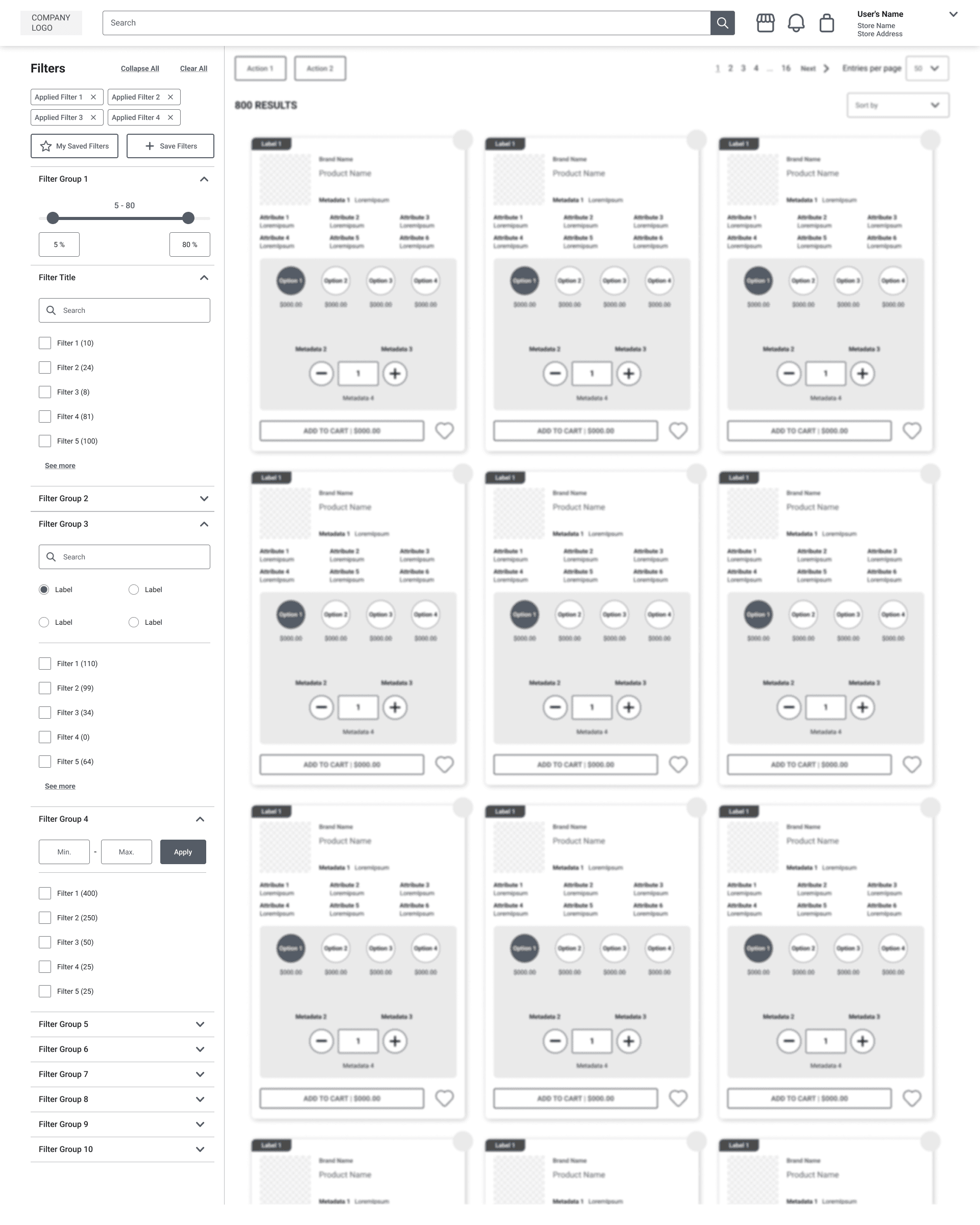
The first design direction responded directly to the most urgent audit finding: restructure the filter layout so users could scan all available options without the disruptive horizontal expansion pattern. The concept was a persistent left-panel filter organized in an accordion — a well-established ecommerce pattern and the most logical starting point given the evidence in front of us.
Filter categories listed vertically in a left panel, collapsed by default, each expanding in place when selected. Controls standardized throughout — checkboxes for multi-select, inline search for long lists, text input fields or sliders for numeric ranges. New filter categories introduced based on retailer research. A dynamic result count and active filter count updated within the panel as users made selections, previewing expected results before applying.
The first design direction responded directly to the most urgent audit finding: restructure the filter layout so users could scan all available options without the disruptive horizontal expansion pattern. The concept was a persistent left-panel filter organized in an accordion — a well-established ecommerce pattern and the most logical starting point given the evidence in front of us.
Filter categories listed vertically in a left panel, collapsed by default, each expanding in place when selected. Controls standardized throughout — checkboxes for multi-select, inline search for long lists, text input fields or sliders for numeric ranges. New filter categories introduced based on retailer research. A dynamic result count and active filter count updated within the panel as users made selections, previewing expected results before applying.
Dynamic iteration
(Results section is blurred to help focus on the filter section)

Non-Dynamic iteration
(Results section is blurred to help focus on the filter section)
What worked:
What worked:
Filter hierarchy immediately clearer — all categories visible and scannable in one view
Accordion organization kept content contained and predictable
Standardized controls removed the visual inconsistency of the existing system
Dynamic counts within the panel gave users more feedback than the current experience provided at any point
Filter hierarchy immediately clearer — all categories visible and scannable in one view
Accordion organization kept content contained and predictable
Standardized controls removed the visual inconsistency of the existing system
Dynamic counts within the panel gave users more feedback than the current experience provided at any point
Why we pivoted:
Why we pivoted:
Moving to three columns reduced product density — a meaningful tradeoff for B2B users evaluating hundreds of SKUs per session
Heavy product cards raised real performance concerns around dynamically updating the entire grid at scale
The hybrid approach created a structural information consistency problem — filter counts updated dynamically in the panel while the product grid remained static, presenting contradictory information side by side with no UI fix available
The final design — overlay-based filtering
The final design — overlay-based filtering
The core problem with the persistent sidebar wasn't the layout — it was the structural conflict between dynamic filter behavior and a non-dynamic results grid. Placing those two states side by side made the inconsistency impossible to resolve at the UI level. The solution was to separate them entirely.
The redesigned experience uses a modal overlay. When a user opens filters, they enter a dedicated filtering workspace — visually and contextually separate from the product grid — where all dynamic behavior operates consistently. When they apply their selections, the overlay closes and the grid refreshes with updated results. The two states never appear on screen simultaneously, eliminating the information conflict entirely.
The core problem with the persistent sidebar wasn't the layout — it was the structural conflict between dynamic filter behavior and a non-dynamic results grid. Placing those two states side by side made the inconsistency impossible to resolve at the UI level. The solution was to separate them entirely.
The redesigned experience uses a modal overlay. When a user opens filters, they enter a dedicated filtering workspace — visually and contextually separate from the product grid — where all dynamic behavior operates consistently. When they apply their selections, the overlay closes and the grid refreshes with updated results. The two states never appear on screen simultaneously, eliminating the information conflict entirely.

The product listing page returns to a full four-column grid. The filter entry point is clearly accessible without dominating the layout.

Opening the filter panel launches the overlay, dimming the product grid behind it to signal a clear mode change. Filter categories are organized in an accordion, collapsed by default. Multiple filter categories can be expanded simultaneously within the overlay.

Accordion headers display selection counts, giving users a persistent summary of active filters across all types without needing to open each one individually.
Long lists like Brand include an inline search field, allowing users to type rather than scroll.
Range filters use min/max text input fields, giving users precise control.
The result count updates dynamically within the overlay as selections are made, giving users a clear expectation of results before they apply. Apply and Clear All are always accessible at the bottom of the overlay.

Applied filter chips appear above the grid when selections are active, giving users persistent visibility of their filter state without requiring the overlay to be open.
Before and After
Before and After

The existing horizontal filter system, with filter content expanding inline and pushing the product grid downward on every interaction.
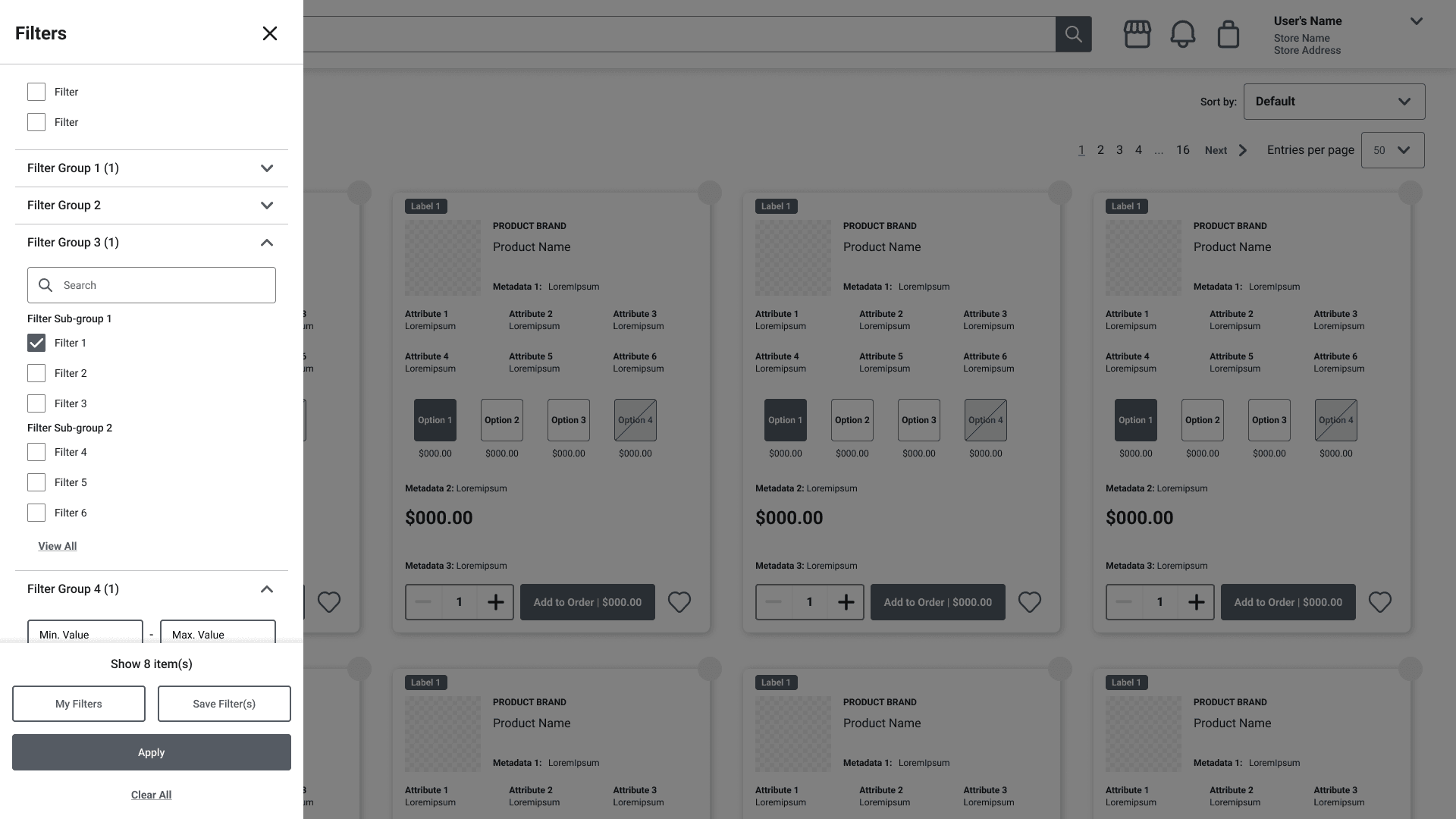
The redesigned overlay, keeping the filtering workspace contained and the product grid undisturbed until filters are applied.
Mobile Designs
Mobile Designs

Default

Active

Multiselect

Range Input
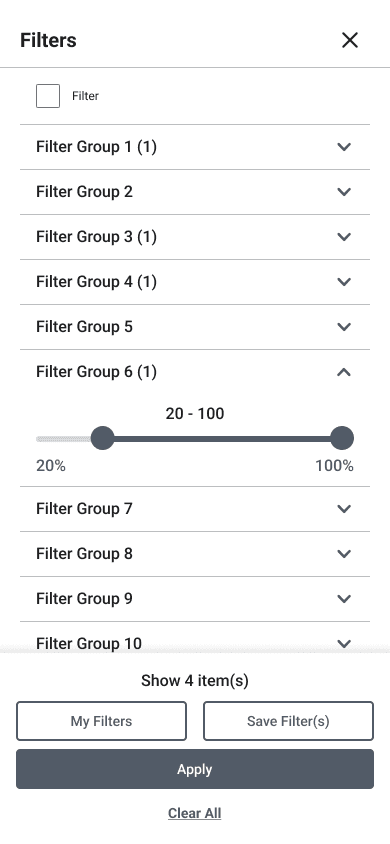
Slider
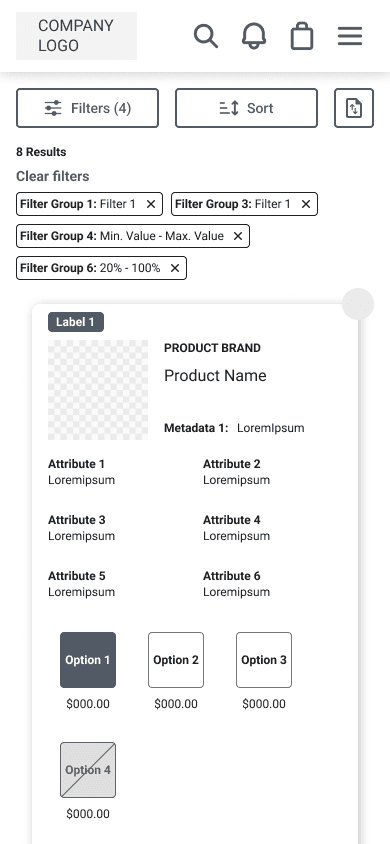
Filter Chips
Demo
Demo
Outcome & reflection
Outcome & reflection
The redesigned filter experience was delivered to the development team as part of a broader PLP redesign, covering product cards and product detail pages. The final solution addressed all high-priority audit recommendations, resolved the structural information consistency problem from iteration 1, and preserved the four-column product density that wholesale ordering workflows depend on. The overlay model established a clear separation between filtering and browsing — a distinction that hadn't existed before and had been a source of friction across all four retailer segments.
The most valuable next step would be usability testing across all four segments — particularly Curation Experts, who would benefit most from saved filter presets and default configurations. Longer term, the segmentation research points to an opportunity worth exploring: whether the filter architecture could adapt based on a retailer's known ordering patterns, surfacing the most relevant filters rather than presenting the same complete set to every user.
The redesigned filter experience was delivered to the development team as part of a broader PLP redesign, covering product cards and product detail pages. The final solution addressed all high-priority audit recommendations, resolved the structural information consistency problem from iteration 1, and preserved the four-column product density that wholesale ordering workflows depend on. The overlay model established a clear separation between filtering and browsing — a distinction that hadn't existed before and had been a source of friction across all four retailer segments.
The most valuable next step would be usability testing across all four segments — particularly Curation Experts, who would benefit most from saved filter presets and default configurations. Longer term, the segmentation research points to an opportunity worth exploring: whether the filter architecture could adapt based on a retailer's known ordering patterns, surfacing the most relevant filters rather than presenting the same complete set to every user.